Patent drawings from a STEP file
If your invention already exists as a CAD model, most of the drawing work is done. What remains is turning that model into sheets the USPTO accepts: the right views, black line art, reference numerals, and the margins and text rules of 37 CFR 1.84.
1. Export a STEP file
Every major CAD tool exports STEP (AP203, AP214 or AP242): SolidWorks, Fusion, Onshape, Inventor, Creo, FreeCAD, KiCad 3D. Export solid bodies, not a mesh. If your parts have names in the model tree (for example "housing", "lid", "spring"), keep them: they make reference numerals easy to assign.
2. Choose the views
Utility drawings must show every feature named in the claims. A typical set is one perspective view plus the orthographic views that show something new: front, top, side, and a section where internal parts matter. Skip a view that only repeats another. Each view becomes a numbered figure (FIG. 1, FIG. 2...).
3. Meet the formal rules (37 CFR 1.84)
| Rule | What it asks |
|---|---|
| Ink and lines, 1.84(a), (l) | Black ink (color only with a granted petition); clean, uniformly thick lines; no grey tones. |
| Sheet and margins, 1.84(f), (g) | Letter or A4; top margin at least 2.5 cm, left 2.5 cm, right 1.5 cm, bottom 1.0 cm. |
| Views, 1.84(h) | Views on the sheet without frames; sections marked with a cutting line and hatched cut faces. |
| Numbering, 1.84(t), (u) | Sheets numbered 1/3, 2/3...; figures labelled FIG. 1, FIG. 2... in order. |
| Reference numerals, 1.84(p), (q) | At least 0.32 cm high, outside the view where possible, with short lead lines that end on the part. |
| Scale, 1.84(k) | Large enough to show detail when reduced to two thirds; no drawn scale bar needed. |
This is a summary to help you check your own sheets; the rule text and MPEP 608.02 are the authority.
4. Add reference numerals
Give each part and each important feature a number (10, 12, 14...), use the same number for the same part in every figure, and use the same numbers in the written description. Holes and bores of one size usually share a numeral.
5. Check every sheet before filing
Formality objections are cheap to avoid and slow to fix after filing. Check margins, line color, text height and figure numbering on the final PDF, not on the CAD screen. The free open-source checker drawlint runs these checks in your browser; your file never leaves your computer.
Or let FigSheet do steps 2 to 5
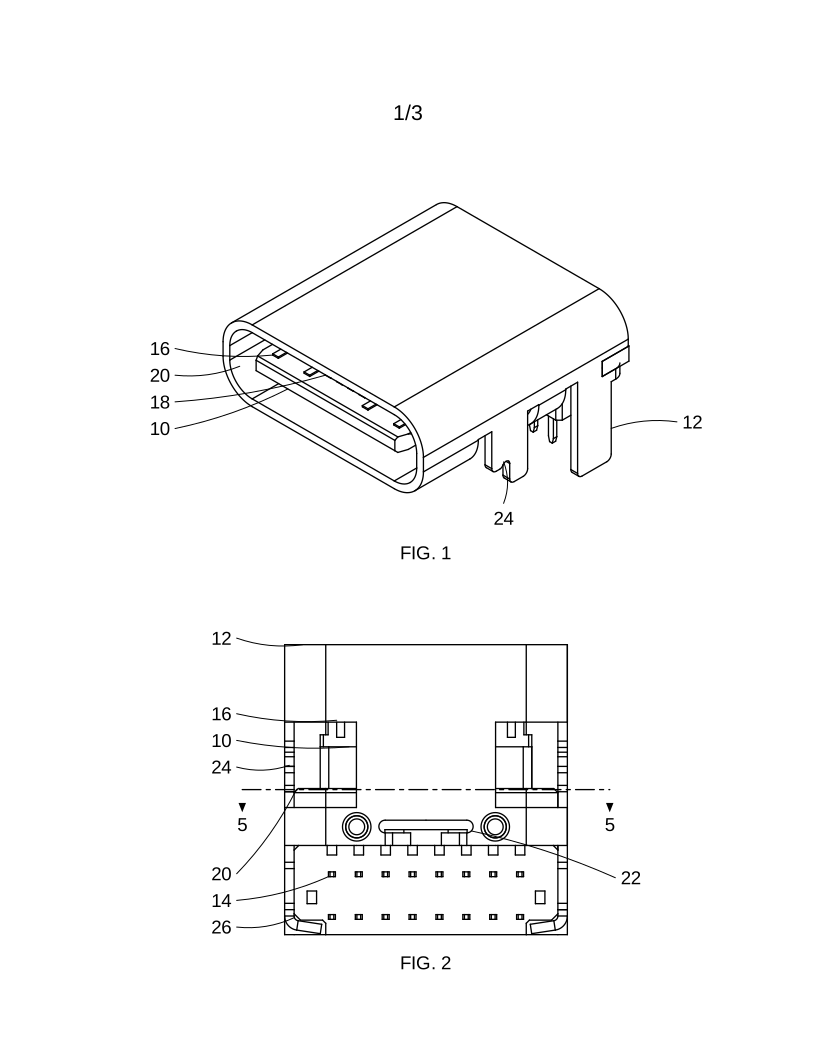
Upload the STEP file. FigSheet picks informative views, numbers each part and hole size, draws a section through the middle of the part, lays out letter sheets within the 1.84 margins and checks every sheet. You see a watermarked preview of every sheet in about a minute, free. The full set (vector PDF, one SVG per sheet, and the check report with the numeral key) is $49 per file.
Upload a STEP file for a free preview
What it does not do: it does not write your claims or description, and it does not judge what your drawings must show for your invention. Those stay with you or your patent practitioner.